Bridging Firewall
The bridging firewall can be deployed to enhance the security of a network, particularly a perimeter network with a block of addresses where a router may not be appropriate. The bridging aspect offers a stealthy solution with the ability to partition the perimeter network into a number of separately protected zones.
The bridge is an additional layer of security that can easily be inserted in place of a switch or hub. The article focusses on a firewall that sits between the service provider’s equipment and three protected networks.
The design and configuration of a bridging firewall is described, using a FreeBSD server with several network interfaces. The example network is a /29 subnet feeding a wireless LAN, a wired LAN, and a small server farm.
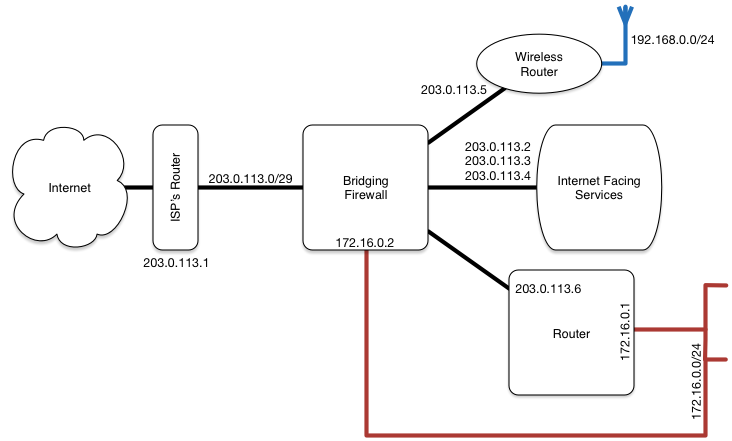
The Zones
The bridging firewall described here consists of four network interfaces participating as a bridge and a fifth network interface for management access from a private LAN. The four bridged interfaces carry traffic within the perimeter network. Each interface and the attached network zone, are colour coded for clarity.
The colour coded zones are:
Green, for the internet facing services
Blue, for the wireless network
Red, for the precious wired network
Black, for the internet side of the bridge, and
Pink, for the management interface
Both the blue and red networks masquerade behind a NAT layer in some other router, and therefore consume a single IP address from the perimeter network.
The Files
The FreeBSD server is configured using relatively few files. The two important files as far as this article is concerned, are listed below (follow the links to view the example files):
The Rules
An IP packet can be scanned several times by the rule set during its passage through the firewall. Rules that contain an in/out clause, apply only to packets passing in or out of the firewall. Rules that contain a recv/xmit clause, apply only to packets received or transmitted through the specified interface.
The first rule starts on line 88 in /etc/rc.firewall.local, and ensures that IP fragments entering the firewall are reassembled before being evaluated further:
reass all from any to any in
The loopback interface and management interface are considered next and their packets do not need to proceed any further:
allow all from any to any via lo0
deny all from any to 127.0.0.0/8
deny all from 127.0.0.0/8 to any
allow all from me to any out xmit pink_interface
allow all from any to me in recv pink_interface
Deny any packet which fails basic sanity checks:
deny all from any to any_illegal_address
deny all from any_illegal_address to any
deny all from not blue_feed to any in recv blue_interface
deny all from any to not blue_feed out xmit blue_interface
deny all from not red_feed to any in recv red_interface
deny all from any to not red_feed out xmit red_interface
deny all from not green_feed to any in recv green_interface
deny all from any to not green_feed out xmit green_interface
deny all from any to not perimeter_network in recv black_interface
deny all from not perimeter_network to any out xmit black_interface
By any_illegal_address we mean any IP address not expected to be seen in the public address space of the perimeter network. These addresses are loaded into a table for efficiency. The _feed and _interface definitions appear in /etc/rc.conf.
The next block finishes with the check-state rule, which is used as a skipto destination, and therefore explicitly numbered. The perimeter network is a block of public IP addresses that exists around all of the bridged interfaces. The address assigned to the ISP’s router (black gateway) should be the only address within the perimeter network that lives on the internet facing (black) side of the bridge.
skipto CHECK all from black_gateway to any in recv black_interface
skipto CHECK all from any to black_gateway out xmit black_interface
add deny log all from perimeter_network to any in recv black_interface
add deny log all from any to perimeter_network out xmit black_interface
CHECK: check-state
Subsequent packets in either direction, that have been passed by a rule with the keep-state clause, will be passed by the preceding check-state rule.
Any locally originated ICMP packet, plus a few others, are permitted. Any incoming packets from a blacklisted source are dropped. The blacklist is implemented as another table.
allow icmp from perimeter_network to any keep-state
add deny log all from any_blacklisted_address to any in recv black_interface
allow icmp from any to any icmptype 3,4,11
Public access to the internet facing services use static rules to help mitigate some forms of DoS attack:
allow tcp from any to green_www http,https
allow tcp from green_www http,https to any established
allow tcp from any to green_mail imaps,submission
allow tcp from green_mail imaps,submission to any established
allow tcp from any to green_mx smtp
allow tcp from green_mx smtp to any established
The green_ definitions appear in /etc/rc.conf.
Access to the internet facing services from within the perimeter network is permitted to use dynamic rules. The ISP’s equipment is explicitly excluded.
deny all from black_gateway to any
allow udp from perimeter_network to green_dns domain keep-state
allow tcp from perimeter_network to green_feed ssh keep-state
Isolate the perimeter network:
add allow all from perimeter_network to black_gateway keep-state
add deny all from any to perimeter_network
The two LANs are permitted to access the outside world:
allow all from blue_and_red_feed to any keep-state
Specific services are permitted to access the outside world. At this point from any can only match the green feed as everything else has been examined.
add allow udp from any to any domain,ntp keep-state
Anything else is denied.